How do I get a receipt for a calling credit top up?
- Receipts are emailed to you automatically once you have topped up online and have an online top up account
- The email address you register with is the one receipts are sent to
- You can also download an invoice for any past top up from your account
How do I set up email receipts?
- Go to the Account section of the app and select "Add Calling Credit"
- Select "Online": this opens the payment section in your browser
- Register for an online account here, using the email address you want receipts sent to
How do I download an invoice for a previous top up?
- Tap the icon in the top right to open the My Account section of the portal
- Scroll down to your previous orders
- Find the order you need and tap the eye icon
- From there you can download the transaction invoice
What else can I do in the online payment section?
- Register for an online account (at the end of the top up)
- Make a top up
- Activate Low Balance Top Up
- Access your receipts
How do I contact support?
- In-app chat is the quickest way to reach us
- Email: ask@whitecalling.com
- Our UK-based team is available Mon-Fri, 9-5
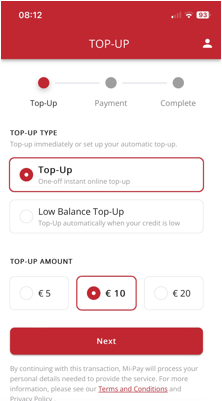
Clicking the icon in the top right will move you into the My Account section of the portal (once you've registered), and if you scroll down the page you can access your previous orders. Just find the order you want a receipt for and click on the eye icon, from here you can download the transaction invoice.
Was this article helpful?
That’s Great!
Thank you for your feedback
Sorry! We couldn't be helpful
Thank you for your feedback
Feedback sent
We appreciate your effort and will try to fix the article