How do I add calling credit?
- Open the app and go to the Account tab
- Tap "Add Calling Credit" (plus icon)
- Choose from three methods:
- Online: recommended
- Phone: automated top-up line (not available in some countries)
- PIN: pre-paid top-up voucher
- Check the amount is correct and add any promo code before you finalise
How do I top up online?
- Open WhiteApp
- Go to the Accounts tab in the bottom navigation
- Tap "Add Calling Credit" (plus icon)
- Tap "Online"
- This opens in your browser: follow the steps and your credit is added to your in-app balance
Which payment methods can I use to top up online?
- Visa or Mastercard
- Apple Pay
- Google Pay
- PayPal
How do I use a promo code?
- Enter it before you finalise your top up
- It cannot be applied once payment is complete
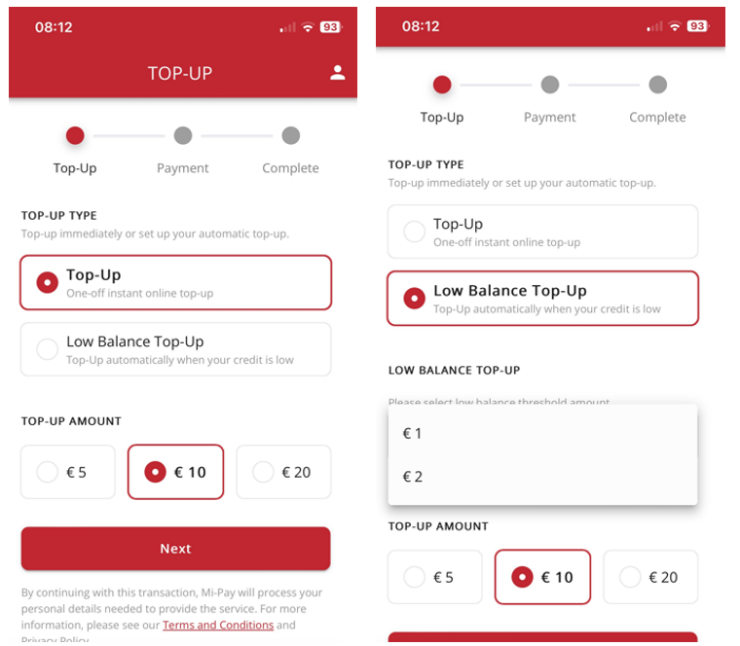
What is Low Balance Top Up?
- It tops up your credit automatically when your balance runs low, so your account stays active
- You can set this up when you top up via 'Online'
- You can view and manage it later in your account if you have created an account via 'Online' top up
Do I need an account to do an 'Online' top up?
- No, you can top up without one but it is recommended that you create one
- At the end of payment, whichever method you used, you'll be offered the option to create an account
- Your email is used to send receipts, and you can save your card details for faster future top ups
Where do I find my account within 'Online' top up?
- Tap the icon in the top right of the screen
What can I manage in my account within 'Online' top up?
- Personal Details: used on your receipts and invoices
- Low Balance Top Ups: view and manage them
- Payment Settings: view and manage your card details
- Previous Orders: view and download invoices
How do I contact support?
- In-app chat is the quickest way to reach us
- Email: ask@whitecalling.com
- Our UK-based team is available Mon-Fri, 9-5
Was this article helpful?
That’s Great!
Thank you for your feedback
Sorry! We couldn't be helpful
Thank you for your feedback
Feedback sent
We appreciate your effort and will try to fix the article